



TL;DR: AI meeting notes tools automatically transcribe your calls, pull out key decisions, and turn conversations into action items — without you having to write a single thing down. For small business owners who run on back-to-back calls and client meetings, they cut hours of admin every week. This guide explains how they work, what to look for, and how the right tool connects your meetings to your bookings and follow-ups in one place.
If you run a small business, your meetings are where decisions happen. A client signs off on a proposal. A team member agrees to a deadline. A new lead asks a question that changes everything. And then the meeting ends, everyone gets back to their day — and half of what was said disappears.
It’s not laziness. It’s just how meetings work. Research from Harvard Business Review consistently shows that most action items from meetings go unfollowed, not because people don’t care, but because no one captured them clearly enough. You’re trying to stay present in the conversation and write everything down at the same time — and neither gets your full attention.
AI meeting notetakers change that. They listen, transcribe, and summarise your calls automatically, so you can focus on the conversation and still walk away with a clear record of what was said and what needs to happen next.
This guide is written for small business owners who aren’t necessarily tech people. No jargon, no complicated setup guides. Just a clear look at what these tools do, how to pick one, and how to get started today.
What Are AI Meeting Notes?
AI meeting notes are automatically generated summaries of your conversations, created by software that listens to your call in real time. The tool transcribes everything said, identifies who said it, and then produces a summary with the key points, decisions made, and action items — usually delivered to your inbox within minutes of the meeting ending.
You don’t type anything. You don’t record it yourself. You just have the meeting, and the notes appear.
Most AI meeting note tools work with the video call platforms you already use: Zoom, Google Meet, and Microsoft Teams. Many also work for in-person meetings — you can run the app on your phone and it picks up the room audio.
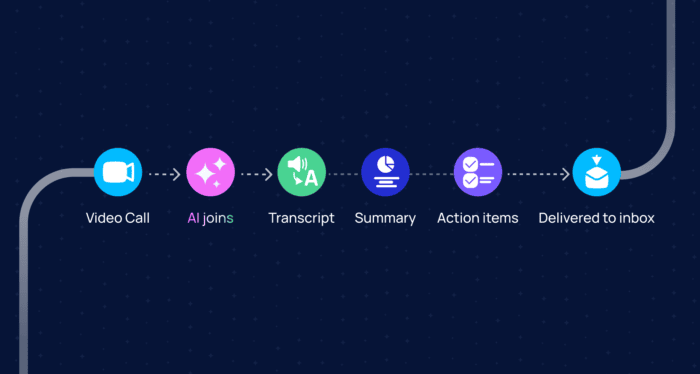
A seamless workflow with AI
How Does an AI Meeting Notetaker Actually Work?
An AI meeting notetaker joins your call as a silent participant, records the audio, converts speech to text using transcription technology, then uses a language model to identify the most important moments and generate a readable summary.
The process has a few distinct steps:
- Transcription — the tool converts spoken words into text, usually with very high accuracy for clear audio
- Speaker identification — it labels who said what, so your notes aren’t just a wall of text
- Summary generation — a language model reads the full transcript and pulls out the key points, decisions, and follow-up tasks
- Delivery — the summary lands in your email, your calendar, or your CRM, depending on the tool
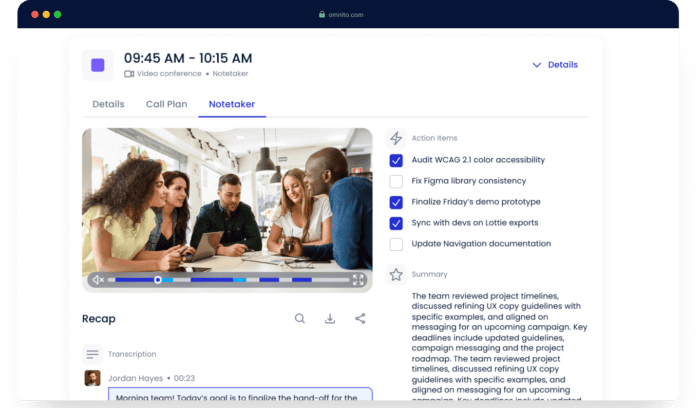
Omnito Notetaker
The whole thing typically takes two to five minutes after the call ends. Some tools generate notes in real time, so you can read along as the meeting is still happening.
One thing worth knowing: some AI notetakers work agnostically. That means even if your meeting was booked through a different tool, or you jumped on a call someone else organised, the notetaker can still join — you’re not locked into one ecosystem. Omnito’s AI Notetaker is one of them. If you’re already on a Google Meet call someone else sent you, you can still add it and it will work just the same.
The Real Cost of Manual Meeting Notes for Small Businesses
Here’s the honest version of what manual note-taking looks like for most small business owners.
I’ll speak from experience here. I genuinely love taking notes by hand. I have beautiful pens, I always have a notebook on my desk, and there’s something about writing things down that helps me think. But the reality is: when a meeting runs long, handwritten notes get fragmented fast. You’re trying to stay present in the conversation, follow up on something someone just said, and write at the same time — and none of those three things get your full attention.
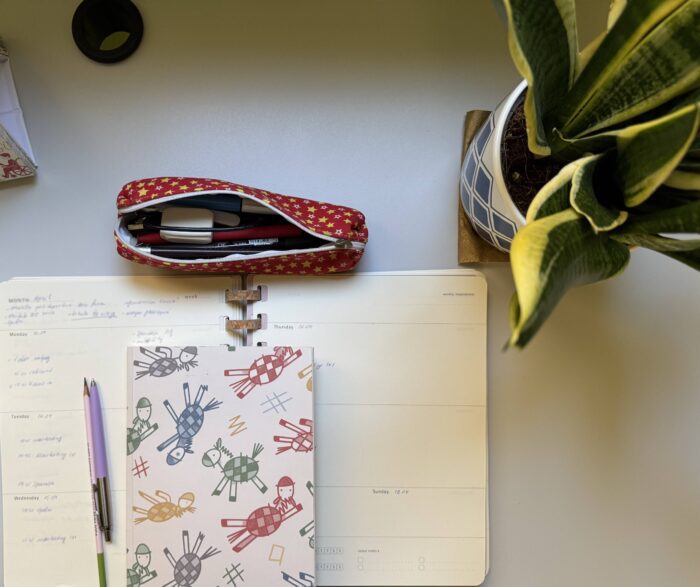
Manual notes are beautiful, but not always practical
Later, looking back at those notes, the shorthand I used in the moment doesn’t always mean what I thought it meant. “Follow up re: proposal — Thuesday?” — follow up with whom? Which proposal? What was I thinking about Tuesday or Thursday?
This is exactly where AI note-taking saves the day. I still take my handwritten notes out of habit — some habits are just part of who you are — but now the AI version is there as the complete, accurate record. The hand notes are for thinking. The AI notes are for doing.
For businesses, this matters beyond one person’s habit. According to Atlassian, the average employee attends 62 meetings per month and considers more than half of them unproductive. A big part of that waste is what happens after the meeting: unclear ownership of actions, no written record, and follow-ups that never get sent.
| Manual meeting notes | AI meeting notes | |
| Time to produce | 15–30 min per meeting | 2–5 min (automated) |
| Accuracy | Depends on the note-taker | High (95%+ for clear audio) |
| Action items captured | Inconsistent | Structured and labelled |
| Searchable later | Rarely | Always |
| Works when you’re presenting | No | Yes |
That last row matters more than people realise. When you’re the one presenting or leading the meeting, you physically can’t take good notes at the same time. AI notetakers solve that entirely.
What Should You Look for in an AI Meeting Notes Tool?
For a small business owner, the right AI meeting notes tool should do four things well: transcribe accurately, work with the tools you already use, pull out action items clearly, and keep your data private.
Here’s what to check before you commit to anything:
- Transcription accuracy — look for tools that specify their accuracy rate for standard English. Most good tools sit above 90–95% for clear audio. Background noise and accents can affect this, so test with your own setup.
- Platform compatibility — it should work with Zoom, Google Meet, and Teams without needing special permissions or IT setup. Omnito’s AI Notetaker joins as a bot participant across all three, and you can set it to auto-join from your calendar or drop it into any live call on demand.
- Action item extraction — gives you a clear picture of what needs to happen after the call and who’s responsible. In Omnito, these come as a checklist so nothing slips through.
- Calendar and workflow integration — the best tools connect to your Google Calendar or Outlook, so notes are automatically attached to the meeting event and the right people get a copy.
- Privacy and security — your client calls contain sensitive information. Look for tools that are GDPR-compliant, offer data deletion, and are clear about where recordings are stored and for how long.
- Price — most good AI notetakers start at $10–20 per user per month. That’s usually worth it within the first week. Be wary of free tools that monetise your data.
Do You Need a Standalone Notetaker or Part of a Bigger Platform?
This is the question most guides skip — and for small business owners, it’s probably the most important one.
Standalone AI notetakers like Otter.ai, Read.ai, and Jamie do one thing: they take notes. They’re good at it. But they’re still another tool sitting next to your booking tool, your inbox, your CRM, and everything else you’re already managing.
For most small businesses, the bigger problem isn’t that the notes are missing. It’s that after the meeting ends, the follow-up gets lost in the gap between tools. You have the notes in one place, the next meeting invite sitting in your email, the action items in your head, and the customer conversation somewhere in your inbox.
This is where an integrated platform makes a real difference. Omnito’s AI Notetaker works the same way as any standalone tool — it joins your existing calls, works with any meeting platform you already use, and delivers a clean summary and action list after every call. But because it’s part of a connected system that also includes Meeting Booker, Live Chat, and follow-up messaging, the note becomes the start of the next action rather than a file you’ll forget to check.
A client meeting ends. The AI produces the summary. The next booking is already built into the same flow.
That’s the difference between a notetaker and a tool that actually closes the loop.
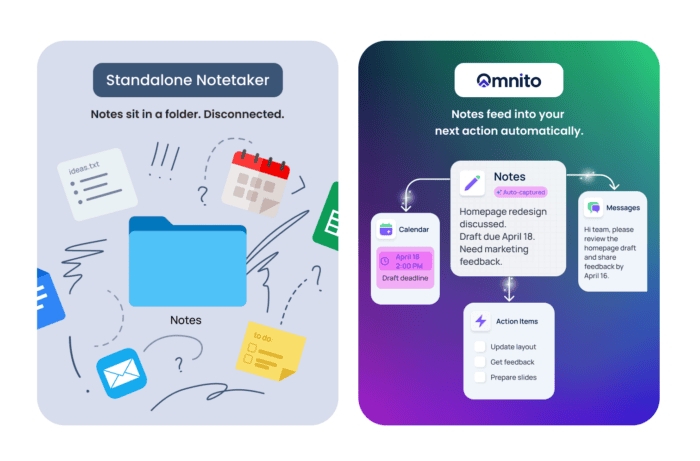
Standalone notetaker vs. Omnito: what happens after the meeting ends
How to Get Started With AI Meeting Notes Today
You don’t need a technical background or an IT department. Here’s the straightforward version for a small business owner:
- Pick your tool. If you want notes only, Otter.ai or Jamie are solid starting points. If you want notes connected to your meeting booking and follow-ups, try Omnito for free.
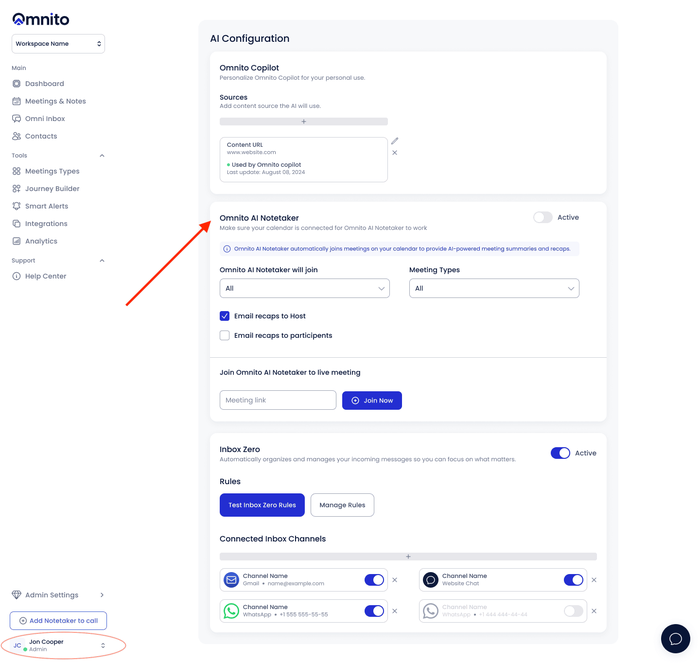
- Connect it to your calendar.This takes about two minutes. Then click on your name, select AI Configuration, and set up how you want AI Notetaker to work. From there, the tool will automatically detect upcoming meetings and you can choose whether to enable notes by default.
- Run your first meeting as normal. The tool joins quietly. You don’t need to tell your client or colleague anything — though it’s good practice to mention you’re recording.
- Review the summary. After the call, you’ll get a structured breakdown: what was discussed, what was decided, and what needs to happen next. Edit anything: the summary, action items, whatever needs adjusting — decide who gets access, and rewatch the recording if you need to go back to a specific moment.
That’s it. No complex setup, no training required.
You Don’t Need to Choose Between Being Present and Being Thorough
AI meeting notes aren’t about replacing the way you work. They’re about removing the part that wasn’t working anyway — the frantic scribbling, the incomplete notes, the follow-ups that never got sent.
Whether you take handwritten notes out of habit, or you’ve been winging it on memory alone, an AI notetaker gives you a complete, accurate record of every conversation without any extra effort on your part.
For small business owners, that means less time on admin and more time on the work that actually matters.
Try Omnito for free and see what your meetings look like when nothing falls through the cracks.
Frequently Asked Questions
What are AI meeting notes and how do they work?
AI meeting notes are automatically generated summaries of your calls and meetings. A tool joins your video call, transcribes everything said, identifies who said what, and produces a structured summary with key points and action items — usually delivered within a few minutes of the meeting ending. You don’t need to type or record anything yourself.
Omnito’s AI Notetaker works exactly this way: it joins your Zoom, Google Meet, or Microsoft Teams calls automatically, then converts the conversation into structured outcomes: smart summaries, action items with owners and deadlines, and CRM updates logged without any copy-paste. You can also search across all your meeting transcripts instantly, turning past conversations into a searchable knowledge base your whole team can use.
Are AI meeting notetakers accurate?
Most leading tools achieve 90–95% transcription accuracy for clear audio in standard English. Accuracy can drop with heavy accents, background noise, or fast crosstalk between speakers. The best way to test is to run a short internal call first and check the output against what was actually said.
Can AI meeting notes tools work with Zoom, Google Meet, and Teams?
Yes. Most AI notetakers, including Omnito, are platform-agnostic — they work with whatever video call software you’re already using. They typically join as a silent bot participant or through a browser extension. You can also add an AI notetaker to a call you didn’t organise yourself, as long as you have access to the meeting link.
Is it safe to use AI to record and transcribe my business meetings?
It depends on the tool. Reputable AI notetakers are transparent about where your recordings are stored, offer clear data deletion controls, and comply with applicable privacy laws. Before using any tool for client calls, check its privacy policy and confirm it meets any compliance requirements relevant to your industry. Omnito, for example, publishes clear data retention schedules and acts as a data processor under your instructions — meaning your data isn’t used beyond the purposes you’ve agreed to. As a general rule, always inform participants when a call is being recorded.What’s the difference between a standalone AI notetaker and an all-in-one platform?
A standalone AI notetaker records and summarises your meetings — and does that job well. An all-in-one platform does the same thing, but also connects those notes to your meeting booking, inbox, and follow-up workflow. For small businesses that want to reduce the number of separate tools they manage, an integrated platform means the note automatically feeds into the next step, rather than sitting in a separate app. Omnito is built this way — one connected platform for messaging, scheduling, meetings, notes, and follow-ups, so teams can engage, book, meet, and follow up without losing context or switching tools.
Start Free Trial
Create an Omnito account in seconds.
Get stated
- Saved to Salesforce
- Searchable in Einstein
- Smart notes & follow-ups
- Works with your calendar & tools
- No Agentforce needed

Recent Articles

 Google
  Microsoft




Hi, I'm Nito!
I'm here to help. Who should I connect you with?